Inspect Qdrant Queries in the Browser Before They Hit the API
QQL WASM parses and projects REST routes locally while you type. Execute only when you click. No cluster round-trip in the editor.
On this page
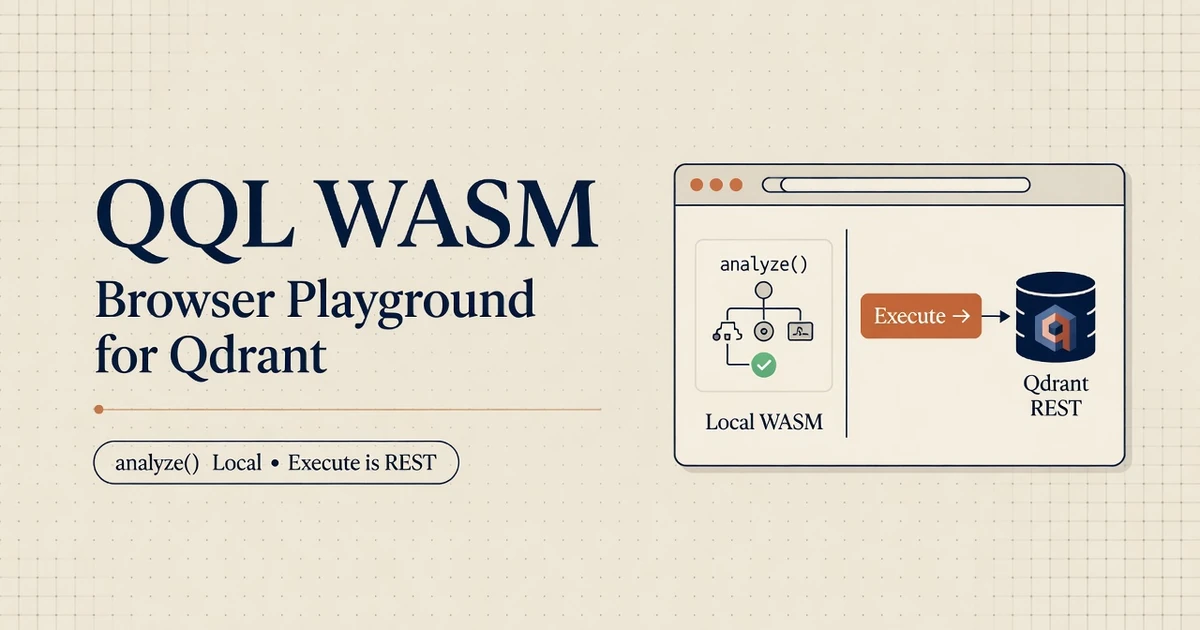
Typing in a Qdrant playground should not hit the cluster. qql-wasm parses the statement, builds the AST, and projects the REST route inside the browser.1 Storage stays on Qdrant (or edge). The WASM module is a compiler, not a database.
API keys and cluster URLs sit unused until the user clicks Execute. That split is the whole product: diagnose locally, send bytes only on purpose.
Analyze QQL in the browser with no network
Installing qql-wasm into a modern front-end build pipeline requires adding the npm package and initializing the underlying WebAssembly module during page load:
npm install [email protected]1.1 Programmatic WASM Module Initialization
The core offline entry point for browser applications is analyze(). It parses source query strings, generates Abstract Syntax Trees, calculates token offsets, and projects target REST request structures without opening socket connections or invoking browser fetch APIs:
import init, { analyze } from "qql-wasm";

async function initializePlayground() {
  // Initialize the WebAssembly binary module
  await init();

  const querySource = "QUERY TEXT 'refund policy' FROM docs USING dense LIMIT 5";
  const analysisResult = analyze(querySource);

  if (!analysisResult.valid) {
    console.error("Syntax Error:", analysisResult.error);
    return;
  }

  // Inspect offline AST and REST projections
  console.log("Tokens:", analysisResult.tokens);
  console.log("AST:", analysisResult.ast);
  console.log("REST Route:", analysisResult.route ?? analysisResult.routes);
  console.log("Execution Plan:", analysisResult.explain);
}

initializePlayground();
1.2 Inspection Panel Payload Breakdown
The payload returned by analyze() provides full visibility into query compilation structure:
| Inspection Panel | AST Payload Property | Engineering Diagnostic Value |
|---|---|---|
| Syntax Tokens | tokens |
Highlights keyword boundaries and string delimiter errors |
| Abstract Syntax Tree | ast |
Displays formal query structure without heuristic guesses |
| Wire Route | route / routes |
Projects exact HTTP method, REST path, and JSON payload |
| Query Intent | explain |
Summarizes execution plan and index requirements |
| Error Diagnostics | error |
Specifies precise line and character spans for syntax failures |
When a query contains syntax errors, analyze() yields span coordinates that light up the invalid character range in the editor, preventing invalid requests from reaching downstream server infrastructure.
Offline compilation in WebAssembly guarantees that typing inside an editor panel never emits premature HTTP requests or leaks secret API tokens.
Offline syntax analysis transforms how frontend applications interact with vector databases. Rather than relying on round-trip API calls to detect invalid field names or clause order errors, browser applications validate queries in real time using compiled WebAssembly routines.
Building interactive documentation, internal developer portals, and query visualizers becomes significantly safer with WebAssembly compilation. Engineering teams can expose full query authoring tools to external developers without risking API quota consumption or exposing backend infrastructure to unvalidated inputs.
Wire CodeMirror to analyze() on a debounce
Building a responsive query editor requires coupling CodeMirror 6 with debounced invocation of the WebAssembly analyze() function.2 Debouncing prevents unnecessary CPU work during rapid typing while maintaining instant visual feedback for the user.
2.1 CodeMirror 6 Extension Listener
import { EditorState } from "@codemirror/state";
import { EditorView, keymap } from "@codemirror/view";
import { defaultKeymap } from "@codemirror/commands";
import init, { analyze } from "qql-wasm";

let debounceTimer: number | undefined;

async function setupEditor() {
  await init();

  const editorView = new EditorView({
    state: EditorState.create({
      doc: "QUERY TEXT 'refund policy' FROM docs USING dense LIMIT 5",
      extensions: [
        keymap.of(defaultKeymap),
        EditorView.updateListener.of((update) => {
          if (!update.docChanged) return;

          window.clearTimeout(debounceTimer);
          debounceTimer = window.setTimeout(() => {
            const currentSource = update.state.doc.toString();
            inspectQuery(currentSource);
          }, 120);
        }),
      ],
    }),
    parent: document.querySelector("#editor-container")!,
  });
}

function inspectQuery(source: string) {
  const info = analyze(source);
  updateDiagnosticsPanel(info);
}
2.2 Token-Driven Syntax Highlighting
This editor setup keeps network requests off the typing loop. CodeMirror manages input rendering, analyze() computes syntax diagnostics in WebAssembly, and the user interface labels the execution control with the target endpoint URL (Execute against http://localhost:6333).
Highlighting keywords using real token spans derived from tokens guarantees syntax coloring matches the underlying compiler parser rather than regex pattern matching.
Coupling syntax highlighting to token streams eliminates common editor display glitches. When operators type multiline strings or complex nested filters, the editor applies syntax themes based on AST token boundaries rather than fragile regular expressions.
Debounce intervals between 100ms and 150ms achieve an optimal balance between low input latency and efficient CPU utilization. On modern hardware, WebAssembly AST parsing completes in sub-millisecond timeframes, ensuring that the main UI thread remains fluid during active typing sessions.
Load MiniLM only when Execute needs a vector
Performing semantic text search requires converting natural language text into dense float vectors. For collections configured with 384-dimensional MiniLM embeddings, vector generation can occur locally inside the browser using ONNX models powered by Hugging Face Transformers.js.3
3.1 WebGPU Pipeline Initialization
Loading machine learning models during initial page render wastes memory and network bandwidth. The optimal pattern initializes embedding pipelines lazily upon the first query execution:
import { pipeline } from "@huggingface/transformers";

let embeddingPipeline: Awaited<ReturnType<typeof pipeline>> | undefined;

async function generateDenseVector(textInputs: string[]): Promise<number[][]> {
  if (!embeddingPipeline) {
    try {
      // Attempt WebGPU acceleration first for hardware performance
      embeddingPipeline = await pipeline("feature-extraction", "Xenova/all-MiniLM-L6-v2", {
        device: "webgpu",
      });
    } catch {
      // Fallback to WebAssembly execution when WebGPU is unavailable
      embeddingPipeline = await pipeline("feature-extraction", "Xenova/all-MiniLM-L6-v2", {
        device: "wasm",
      });
    }
  }

  const output = await embeddingPipeline(textInputs, { pooling: "mean", normalize: true });
  return output.tolist() as number[][];
}
3.2 Binding Embedders to QQL Client
The Xenova/all-MiniLM-L6-v2 model generates normalized 384-dimensional vector arrays suitable for Qdrant dense vector fields.3 Front-end interfaces should display clear status indicators distinguishing asset download from active vector inference.
Connecting local vector generation to QQL WASM client execution is accomplished through setEmbedder:
import init, { Client } from "qql-wasm";

async function executeLocalSearch() {
  await init();

  const client = new Client("http://localhost:6333", null);
  client.setEmbedder(generateDenseVector);

  try {
    const report = await client.execute(
      "QUERY TEXT 'refund policy' FROM docs USING dense LIMIT 5",
      { onError: "stop" },
    );
    console.log("Execution Report:", report);
  } finally {
    client.free();
  }
}Lazy evaluation minimizes initial page load weight. Users who visit a query playground to inspect AST syntax or review execution plans avoid downloading multi-megabyte model files until they choose to execute a text vector search query.
WebGPU acceleration dramatically improves vector inference speeds on modern browsers.4 When WebGPU is supported by the client hardware, embedding 384-dimensional vectors completes in milliseconds, bringing server-grade inference performance directly into client browser sessions.
When the playground calls a remote embedder
When applications rely on custom embedding models or proprietary API providers, client-side vector generation can be replaced with remote HTTP embedding endpoints.
4.1 Configuring Remote HTTP Embedders
const client = new Client("https://qdrant.example.net", "qdrant-api-key");

// Configure remote HTTP embedding service
client.setHttpEmbedder(
  "https://embeddings.example.net/v1/embeddings",
  "nomic-embed-text",
  768,
  "embedding-api-key"
);
4.2 Security Considerations for External Endpoints
This pattern routes query strings to a dedicated embedding service prior to issuing vector search requests against Qdrant. While effective for serverless environments, engineering teams should distinguish remote API hops from pure offline browser execution.
Standard web security policies apply: CORS headers must be enabled on the target Qdrant instance, API credentials must be handled securely, and transport errors should be distinguished from query syntax failures.
Remote HTTP embedders enable organizations to standardize vector embedding models across browser tools and backend microservices. When vector spaces require large language model encoders that exceed browser memory limits, remote HTTP embedders provide a reliable alternative. Server-side isolation is inject_filter. The Go gateway post is archived with qql-go.
Managing API credentials securely in browser applications requires careful architectural choices. Client-side applications should use short-lived session tokens or proxy endpoints to avoid embedding long-term API keys into frontend JavaScript bundles.
Inject tenant filters in the browser before Execute
User-authored or LLM-generated queries pasted into a web playground should undergo host policy enforcement prior to execution. QQL WASM exposes programmatic AST manipulation tools through the Stmt class:
5.1 Programmatic AST Injection
import init, { Stmt, Client } from "qql-wasm";

async function executePolicedQuery(client: Client, rawQuery: string) {
  await init();

  const statement = new Stmt(rawQuery);

  // Enforce mandatory tenant filter isolation at the AST level
  statement.injectFilter("tenant_id", "=", "acme");

  // Configure physical shard routing for custom-sharded collections
  statement.shardKey = "acme";

  try {
    const report = await client.executeStmt(statement);
    console.log("Policed Execution Report:", report);
  } finally {
    statement.free();
  }
}
5.2 Sandbox Security Boundaries
There is no injectShardKey method in QQL 0.1.5. Security isolation is governed by injectFilter, whereas physical routing is specified via shardKey or the SHARD syntax clause. For complete isolation mechanics, refer to our AST filter injection post. For in-process offline execution without HTTP servers, explore our QQL Edge post.
Programmatic statement manipulation ensures that browser tools cannot bypass tenant boundaries. By transforming AST nodes inside WebAssembly before network serialization, host applications guarantee that mandatory security parameters are embedded into every REST request payload.
Enforcing security policies inside WebAssembly binaries prevents client-side tampering before wire payloads ever hit the network.
Enforcing security policy inside WebAssembly binaries adds an extra layer of defense against client-side tampering. Even if an end user attempts to modify raw JavaScript objects in browser dev tools, the underlying WebAssembly AST transformer validates structural integrity before wire encoding. Similar extraction hygiene principles are detailed in our Schema-First LLM Wiki post and Recursive LM Agent Retrieval.
Ship analyze() first. Execute is opt-in.
When constructing a web-based Qdrant query tool, focus on core diagnostic capabilities before adding visual extensions:
6.1 Recommended Implementation Checklist
- Diagnostic Inspection Panel: Display raw tokens, AST JSON, REST route projections, and precise error spans.
- Debounced Editor Controls: Integrate CodeMirror update listeners with 100-150ms debounce intervals.
- Explicit Execution Controls: Label execution actions clearly with target cluster hostnames.
- Lazy Vector Loading: Initialize local embedding pipelines only when executing text-to-vector queries.
- Confirmation Dialogs: Require explicit user confirmation before executing
UPSERT,DELETE, or DDL statements.
6.2 Offline Diagnostic Fallbacks
When network execution fails due to CORS misconfigurations or offline endpoints, preserve the current query analysis on screen and offer the projected REST JSON as a cURL export. This approach converts browser transport failures into practical diagnostic workflows.
Providing exportable cURL payloads allows operators to debug network connectivity issues independently of browser CORS restrictions.5 When frontend fetch calls are blocked by browser security policies, operators can copy the exact projected REST body into terminal workflows for immediate testing.
Iterative feature delivery allows development teams to validate core WebAssembly compilation before adding complex visual editors or multi-model embedding pipelines. Prioritizing diagnostic panels ensures that developers receive immediate utility from offline AST inspection.
Frequently asked questions
Does QQL WASM run Qdrant in the browser?
No. It compiles the query in WebAssembly. Vectors and indexes stay on a Qdrant URL you pass to Execute, or you skip Execute and only inspect the plan.
Can I see the REST body before sending it?
Yes. analyze() returns the projected route and payload. That is the point of the playground: look at the JSON Qdrant would have received, then click Execute.
Will typing in the editor leak the API key?
Not if Execute is a separate action and the key is not interpolated into analyze(). Keep compile local. Attach api-key only on the explicit fetch.
Related: QQL 0.1.5, local edge search.
Footnotes
-
QQL.
qql-wasm0.1.5 package documentation and API exports (analyze,Client,Stmt). npm(opens in a new tab) · GitHub(opens in a new tab). ↩ -
CodeMirror. Extensible code editor documentation and state management. codemirror.net/docs(opens in a new tab). ↩
-
Xenova.
all-MiniLM-L6-v2ONNX model repository and feature extraction benchmarks. Hugging Face(opens in a new tab). ↩ ↩2 -
W3C. WebGPU API specification and browser hardware acceleration standards. w3.org/TR/webgpu(opens in a new tab). ↩
-
MDN Web Docs. Cross-Origin Resource Sharing (CORS) security guidelines for REST APIs. developer.mozilla.org(opens in a new tab). ↩