Run Local Vector Search in Python Without a Qdrant Server
Build local vector search in Python and Node with pyqql-edge. Embed Qdrant and FastEmbed in-process with zero server setup, disk persistence, and real scores.
On this page
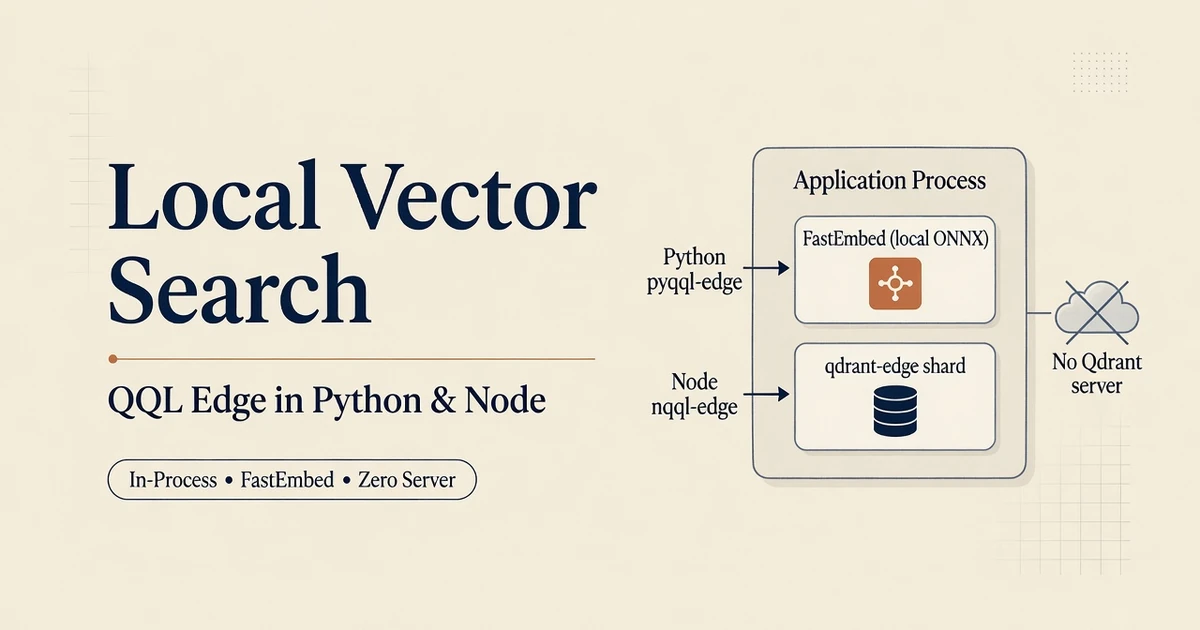
QQL Edge is a local vector search engine for Python and Node that runs in-process. It bundles declarative QQL query execution, ONNX embedding generation via fastembed-rs, and an embedded qdrant-edge storage shard directly inside your host application process. You never launch a background daemon, run a Docker container, or manage remote network sockets.12
Running a full vector database cluster makes sense for enterprise platforms handling hundreds of millions of vectors across distributed nodes. For desktop applications, CLI developer tools, automated test fixtures, and local data scrapers, spinning up a remote database creates unnecessary operational friction. You need real vector indexing, dense and sparse vectors, and semantic similarity scoring without infrastructure overhead.
Local edge execution solves this problem by embedding the database and embedding model into your host runtime. Point the executor at a local directory on disk, write declarative QQL statements, and run local vector search immediately.
01. The Single-Package Architecture: Storage, Planner, and Inference in One Wheel
A common point of confusion around local vector search is assuming you must assemble multiple independent tools. Developers often think they need a database container, a local HTTP embedding proxy, an async event loop, and a model manager.
With pyqql-edge, you install exactly one package:
pip install pyqql-edge==0.1.5In Node.js environments, you install the equivalent native addon:
npm install @veristamp/[email protected]Under the hood, that single native wheel coordinates four internal subsystems directly inside your host process:
- Host Process Binding: PyO3 (Python) or N-API (Node.js) exposes native, zero-copy methods to your application code.
- In-Process Storage Engine: An embedded
qdrant-edgeinstance writes vector segments and payload metadata directly to a local directory, behaving like SQLite for vector data.3 - Embedded Query Planner:
qql-coreandqql-planparse, type-check, and plan statements in memory without network hops. - Local Model Inference:
fastembed-rsruns ONNX models via CPU SIMD instructions (ort), automatically caching weights into.fastembed_cacheorFASTEMBED_CACHE_DIRon first run.4
Because every component resides in the same memory space, queries never cross a network interface. Sensitive text payloads and vector embeddings stay strictly in host memory, satisfying air-gapped data compliance requirements.
Local pyqql-edge execution keeps document contents and search queries strictly inside host memory, providing complete data privacy by design.
02. Hands-On Python: Setup, Ingestion, and Hybrid Querying
Getting started in Python takes less than ten lines of code. The local_executor constructor initializes the embedded storage directory and loads the local embedding model:
from pathlib import Path
import pyqql_edge

# Point to an on-disk directory for index persistence
storage_path = Path("./qql-edge-data")

# Context manager ensures automatic cleanup on process exit
with pyqql_edge.local_executor(str(storage_path), model="bge-small-en-v1.5") as client:
    # 1. Create a collection supporting both dense vectors and sparse BM25
    client.execute("CREATE COLLECTION documents HYBRID")

    # 2. Insert a point record with text and structured payload attributes
    client.execute("""
        UPSERT INTO documents VALUES {
            id: '7b2b8c5e-85a7-47b2-b13c-246014e7a83d',
            text: 'Refund requests require proof of purchase within thirty days.',
            category: 'billing'
        }
    """)

    # 3. Perform local vector search using natural language
    report = client.execute(
        "QUERY TEXT 'refund window for items' FROM documents USING dense LIMIT 3",
        on_error="stop",
    )

    for hit in report.hits(0):
        print(f"Match: id={hit.id}, score={hit.score:.4f}, payload={hit.payload}")
The execution report confirms local operation details without opening network sockets:
CREATE COLLECTION → ok=True, operation=CREATE_COLLECTION, succeeded=1
UPSERT            → ok=True, "Upserted 1 point(s)", count=1
QUERY             → ok=True, "Found 1 hits"
                    id=7b2b8c5e-85a7-47b2-b13c-246014e7a83d
                    score≈0.7621
                    payload.category=billing
High-Throughput Bulk Ingestion
When ingesting hundreds or thousands of documents, executing individual UPSERT statements introduces unnecessary parser overhead. Instead, use client.upsert_many() to ingest structured batches in bulk:
records = [
    {
        "id": 1001,
        "text": "Enterprise subscriptions include dedicated technical account managers.",
        "tier": "enterprise",
    },
    {
        "id": 1002,
        "text": "Standard plans offer community forum support with 48-hour response times.",
        "tier": "standard",
    },
    {
        "id": 1003,
        "text": "Self-hosted edge instances require zero outbound internet connectivity.",
        "tier": "edge",
    },
]

# Ingest in chunks of 50 points directly into local storage
client.upsert_many("documents", records, batch_size=50)

# Optional: trigger segment compaction after bulk ingestion
client.optimize("documents")
The underlying Rust engine extracts text fields, generates vector embeddings via CPU SIMD in batches, and commits point records to disk in a single transaction. This bulk ingestion pattern matches the high-throughput pipelines documented in our QQL 0.4.0 guide.
03. Node.js with nqql-edge: Native Addon Workflows
Node.js applications access the same embedded engine through @veristamp/nqql-edge. This package is compiled via napi-rs as a native addon:
const { localExecutor } = require("@veristamp/nqql-edge");

async function runLocalEdgeSearch() {
  const client = localExecutor("./qql-edge-data", {
    model: "bge-small-en-v1.5",
    onDiskPayload: false,
  });

  try {
    // 1. Create a hybrid collection
    await client.execute("CREATE COLLECTION knowledge HYBRID");

    // 2. Insert document record
    await client.execute(`
      UPSERT INTO knowledge VALUES {
        id: '9f8e4d2a-1c3b-4e5f-a6b7-8c9d0e1f2a3b',
        text: 'TLS certificates rotate automatically every sixty days.',
        team: 'infrastructure'
      }
    `);

    // 3. Run local vector search query
    const report = await client.execute(
      "QUERY TEXT 'ssl certificate renewal policy' FROM knowledge USING dense LIMIT 3",
      { onError: "stop" }
    );

    console.log("Hits found:", report.hits(0));
  } finally {
    // Release file lock and flush buffers
    await client.close();
  }
}

runLocalEdgeSearch();
This workflow is well suited for Electron desktop apps and local developer CLI tools. Instead of bundling a separate database binary or requiring users to install Docker, the entire search pipeline is packaged directly within the application distribution. If you need browser-only compilation without disk storage, review our WASM playground guide.
04. Synchronous fastembed-rs versus Remote HTTP Endpoints
Underneath qql-edge, local vector generation is handled by fastembed-rs. Unlike Python embedding packages that depend on PyTorch or TensorFlow, fastembed-rs is engineered specifically for fast, synchronous systems performance:4
- Synchronous CPU Execution: Runs synchronously without requiring a Tokio async runtime context, eliminating async task spawning overhead for batch embedding calls.
- Hardware SIMD Acceleration: Uses
@pykeio/ort(the Rust ONNX Runtime binding) to run AVX-512 instructions on modern x86 processors and NEON on Apple Silicon.5 - Quantized Model Support: Supports 8-bit quantized models such as
BGESmallENV15Qto reduce RAM usage by up to 75% on resource-constrained hardware. - Multi-Modal Options: Supports dense models (
bge-small-en-v1.5,nomic-embed-text-v1.5), sparse BM25 models, and cross-encoder rerankers.
Hardware Acceleration Profiles
Different host architectures benefit from specific hardware execution backends:
- Linux x64: Automatically detects AVX-512 and AVX2 instruction sets, generating 384-dimensional embeddings in less than one millisecond per short document.
- macOS Apple Silicon: Uses ARM NEON vector instructions directly, ensuring low power consumption on M-series laptops and edge gateways.
- Windows x64: Supports DirectML acceleration through
ort, offloading matrix computations to integrated or discrete GPUs without requiring Nvidia CUDA driver installations.
Memory Footprint and Sizing Guidelines
In-process vector search memory consumption consists of two primary parts: the ONNX model session and the embedded vector index.
For a collection containing 100,000 documents with 384-dimensional vectors (bge-small-en-v1.5), raw vector storage requires approximately 153 megabytes in memory. The HNSW graph structure adds approximately 60 to 80 megabytes depending on connectivity parameters (m and ef_construct).
Using 8-bit quantized model enums like BGESmallENV15Q reduces ONNX model weight footprints from 130 megabytes down to 35 megabytes. Total working set memory stays comfortably under 350 megabytes on a standard laptop or edge container.
Local FastEmbed vs Remote HTTP Endpoints
In some architectures, you may want to generate embeddings on a centralized GPU server while keeping storage local. QQL supports this through remote HTTP embedders:
# Remote HTTP Embedding Architecture (requires network connectivity)
import pyqql

http_embedder = pyqql.HttpEmbedder(
    endpoint="https://embeddings.example.net/v1/embeddings",
    model="managed-model-v1",
    dimension=768,
    api_key="secret-api-key",
)
Choosing between local and remote embedding depends on hardware constraints:
- Choose local FastEmbed when you need zero network dependencies, complete data privacy, and sub-millisecond embedding latency on host CPUs.
- Choose remote HTTP embedders when you require frontier models exceeding local RAM budgets or when host devices lack SIMD vector acceleration.
In air-gapped environments, bake model cache files (FASTEMBED_CACHE_DIR or .fastembed_cache) directly into container images during build time. This ensures processes start with zero outbound network calls.
05. The Storage Contract: SQLite-Style Single-Process Locks and Persistence
QQL Edge manages data persistence using an embedded shard directory. Understanding how this storage layer works prevents concurrency errors.
The Single-Writer Invariant
The embedded storage directory functions like SQLite. A single OS process acquires an exclusive file lock on the shard directory when local_executor opens.
If a second process attempts to open the same storage path concurrently, the engine throws a lock acquisition error. This invariant prevents concurrent writers from corrupting index files. For multi-process concurrent access, deploy a standard Qdrant server cluster.
Configuring Storage Thresholds
You can tune Write-Ahead Log (WAL) segment capacity using optional parameters:
# Configure a 64 MiB WAL segment capacity and on-disk payload storage
executor = pyqql_edge.local_executor(
    "./qql-edge-data",
    on_disk_payload=True,
    wal_segment_mb=64.0,
    model="bge-small-en-v1.5",
)
Setting on_disk_payload=True instructs the underlying storage engine to keep payload attributes on disk rather than caching everything in RAM, which is ideal for large datasets with extensive metadata text.
Verifying Persistence Across Process Restarts
Data written to the storage directory persists across process lifecycles. Here is an automated verification script:
from pathlib import Path
import pyqql_edge

storage_path = Path("./qql-edge-data")

# Session 1: Write records and cleanly close the client
with pyqql_edge.local_executor(str(storage_path), model="bge-small-en-v1.5") as ex1:
    ex1.execute("CREATE COLLECTION notes HYBRID")
    ex1.execute("""
        UPSERT INTO notes VALUES {
            id: '1a2b3c4d-5e6f-7a8b-9c0d-1e2f3a4b5c6d',
            text: 'System kernel configuration was patched on Tuesday morning.',
            environment: 'staging'
        }
    """)

# Session 2: Reopen the directory in a separate client instance
with pyqql_edge.local_executor(str(storage_path), model="bge-small-en-v1.5") as ex2:
    results = ex2.execute(
        "QUERY TEXT 'kernel patch status' FROM notes USING dense LIMIT 5",
        on_error="stop",
    )
    assert results.succeeded == 1, "Persistence verification failed!"
    print("Persistence verified: record retrieved across process restart.")
Calling client.close() or exiting a with block flushes in-memory vector index updates to disk and releases file system locks.
06. Fail-Closed Error Handling: Topology Ambiguity and Point ID Contracts
QQL Edge avoids silent fallbacks. When statements violate storage contracts or query specifications, the engine returns explicit error codes:
| Error Scenario | Specific Error Code | Runtime Root Cause | Resolution |
|---|---|---|---|
QUERY TEXT 'refund' FROM docs LIMIT 5 |
QQL-MISSING-USING |
Ambiguous topology in hybrid collection | Specify USING dense or USING sparse |
UPSERT INTO docs VALUES { id: 'doc-1', ... } |
QQL-EDGE-INVALID-POINT-ID |
Point identifiers must be uint64 or UUID | Use integer (1001) or valid RFC 4122 UUID |
QUERY TEXT 'x' FROM docs SHARD 'acme' |
QQL-EDGE-SHARD-UNSUPPORTED |
Physical sharding applies only to clusters | Use inject_filter() for tenant isolation |
QUERY TEXT 'x' FROM docs GROUP BY cat |
QQL-EDGE-QUERY-GROUPS |
Grouping aggregations require cluster nodes | Perform grouping in application memory |
Resolving Ambiguous Vector Topology
Executing a query without a USING target on a hybrid collection produces an explicit failure:
[QQL-MISSING-USING] Collection 'docs' has an ambiguous vector topology.
Add USING <vector_name>. Available vectors: dense, sparse
To resolve this failure, specify the intended vector target:
-- Query the dense vector index
QUERY TEXT 'refund policy' FROM docs USING dense LIMIT 5;

-- Query the sparse BM25 vector index
QUERY TEXT 'refund policy' FROM docs USING sparse LIMIT 5;
Custom SHARD clauses are also blocked on edge runners. Physical partition routing belongs on distributed Qdrant nodes, whereas tenant isolation on edge runners is managed via inject_filter() as detailed in our 0.1.5 release notes and AST filter injection post.
07. Frequently Asked Questions
Can I run Qdrant vector search in Python without a server?
Yes. Install pyqql-edge via pip and call local_executor("./qql-edge-data"). The library coordinates an embedded qdrant-edge shard and local FastEmbed inside your Python process.
Does the first run require internet access?
Only to download ONNX embedding weights into the local cache directory. Subsequent runs operate completely offline on host hardware. You can also bake the weights directory into container images for air-gapped environments.
Can multiple processes share the same edge directory?
No. The storage directory functions like SQLite with an exclusive file lock. One writer process owns the shard path to prevent index corruption.
How does local edge performance compare to a remote Qdrant cluster?
Local edge avoids network roundtrips and JSON serialization overhead, achieving sub-millisecond similarity scoring for small to medium datasets. For distributed sharding or collections exceeding host RAM, use standard QQL with a remote Qdrant cluster.
Footnotes
-
QQL.
pyqql-edgePython package distribution on PyPI. PyPI(opens in a new tab). ↩ -
QQL.
@veristamp/nqql-edgeNode.js native addon package distribution. npm(opens in a new tab). ↩ -
Qdrant. “What is Qdrant Edge?” Embedded storage architecture documentation. Qdrant Docs(opens in a new tab). ↩
-
Anush008.
fastembed-rsRust library for generating vector embeddings and reranking locally viaortONNX Runtime andtokenizers. crates.io/crates/fastembed(opens in a new tab). ↩ ↩2 -
pykeio.
ort: Rust wrapper for Microsoft ONNX Runtime with CPU, DirectML, and CUDA execution providers. GitHub(opens in a new tab). ↩