Stop Cross-Tenant RAG Leaks Before Qdrant Runs the Search
Qdrant trusts the client filter. Inject tenant predicates into the query AST so agents cannot skip isolation, even under prompt injection.
On this page
TL;DR
- Qdrant supports database-level multi-tenancy:
m = 0plusis_tenant = trueon a keyword field builds per-tenant HNSW subgraphs.- That is not an identity control plane. Qdrant does not validate JWTs. It trusts the client filter.
- The right fix is still: parse QQL, inject the tenant on the AST from a verified identity, then execute. Current QQL does that with
inject_filterin qql-rs.- The Go QQL Gateway demo in this post (JWT, FastAPI, Streamlit) lived in qql-go and is archived with it.
Qdrant will search whatever you ask. It does not check a JWT. A multi-tenant RAG app that sends the caller’s filter from the client is one omitted tenant_id away from a cross-tenant leak. That is not theoretical. Shared-index RAG with metadata-only isolation is a documented failure mode.
We already know not to hand Postgres to the browser. The same rule applies to the vector store. A gateway that parses QQL, injects the tenant on the AST, then talks to Qdrant is that rule applied.
In a standard RAG setup, a user asks a question, the application converts it into an embedding, queries a vector database, and passes the retrieved text chunks to an LLM. But if a client has the database key, they have access to everything. Pointing an LLM-driven AI agent or a multi-tenant SaaS application directly at Qdrant means you are one prompt injection or modified API call away from a major cross-tenant data leak.
Qdrant does have a powerful native mechanism for multi-tenancy1. You can configure your collection with m = 0 to disable the global HNSW graph, and index a keyword payload field (like org or tenant_id) with is_tenant = true. Qdrant then physically co-locates each tenant’s vectors on disk, bypassing the global graph to search only inside isolated, tenant-specific HNSW subgraphs.
This is brilliant for performance: it eliminates noisy-neighbor issues, saves memory, and accelerates search speeds. But it is not a security control plane:
- No Authentication: Qdrant does not validate JWTs, check signatures, or resolve identities.
- Client Trust: Qdrant relies entirely on the client to pass the correct tenant key filter. If an AI agent is prompt-injected and omits the tenant filter, or if a user modifies their client-side request to query another company’s ID, Qdrant will execute it without hesitation.
- Flat Hierarchy: A tenant index only supports a single field. If you need tiered rules, such as isolating by organization (
org), restricting by department (team), and filtering out sensitive files (access != 'confidential'), Qdrant’s native index cannot model them.
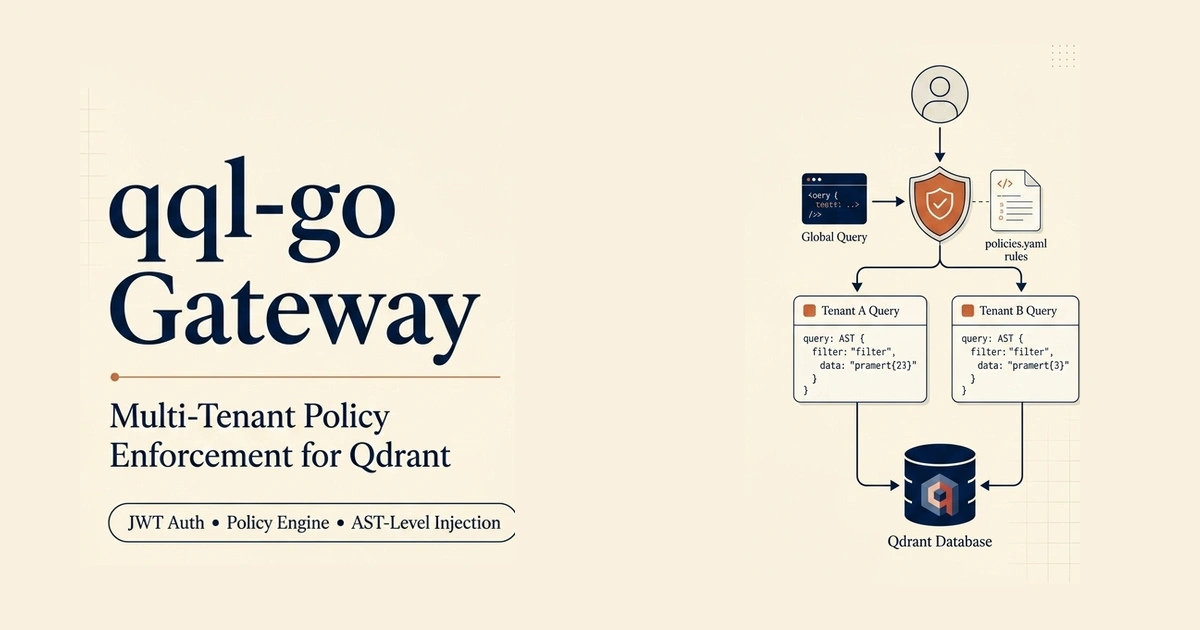
We built the QQL Gateway to act as the secure boundary. Instead of letting untrusted callers contact Qdrant directly, the gateway validates JWT claims, parses QQL queries into an Abstract Syntax Tree (AST), and mutates the query structurally to inject tenant filters.
The RAG Security Trap: Pre-Filtering vs. Post-Filtering
In standard Retrieval-Augmented Generation (RAG) applications, vector search operates entirely on semantic similarity. It has no intrinsic concept of access control. An engineer asking your company’s AI assistant about board-level financials will retrieve those chunks if they are semantically close to the query, simply because similarity algorithms ignore your authorization model. Once a restricted chunk is injected into the LLM prompt, it cannot be un-read or redacted.
To fix this, engineering teams typically resort to one of two design patterns:
1. The Post-Filter Trap
In a post-filtering architecture, the application executes the semantic vector search first. It retrieves the top-$K$ candidate chunks, checks each document against the company’s permission database (or an authorization engine), and discards any chunks the user is not allowed to see.
While simple to implement, post-filtering introduces major issues:
- Context Starvation: If a user queries a topic where the top 3 out of 4 retrieved chunks are forbidden, the post-filter drops those 3 chunks. The LLM is left with a starved, incomplete context window containing only 1 chunk, leading to poor generation quality or hallucinations.
- Latency Overhead: Running authorization checks against a hosted identity provider or a remote relational database after retrieving the vectors introduces a blocking network round-trip for each chunk.
- Leaked Memory: Forbidden data is still loaded into the application’s memory and scored by the vector engine before being filtered out.
2. Pre-Filtering (Zanzibar and OpenFGA)
The alternative is pre-filtering: resolving the user’s access privileges before performing vector search.
For instance, Lakhan Samani demonstrated a Zanzibar-based approach using Authorizer’s embedded OpenFGA engine(opens in a new tab)2. Under this pattern:
- When a user asks a question, the application queries Authorizer/OpenFGA with the user’s token.
- The authorization service checks the relationship graph (relationship-based access control, or ReBAC) and returns an allow-list of document IDs that the user has permission to view.
- This allow-list is passed to Qdrant as a
mustmetadata payload filter. - Qdrant evaluates this condition during the HNSW graph traversal itself. Forbidden vectors are never scored, fetched, or loaded into the application context.
This solves context starvation (the top-$K$ results are fully filled with allowed documents) and ensures immediate revocation, deleting a single relationship tuple in OpenFGA revokes access on the user’s very next query, with no need to re-index Qdrant.
Pre-filtering ensures that unauthorized documents simply do not exist in the retriever’s search space. The model cannot leak what it never sees.
Unified Pre-Filtering at the Query Gateway Layer
While Zanzibar-style pre-filtering is highly secure, passing large allow-lists of document IDs directly to Qdrant’s payload filters has limitations. If a user has access to thousands of documents, passing an array of 5,000 IDs as a MatchAny filter in every search payload degrades vector search latency and hits network payload limits.
The QQL Gateway in the archived srimon12/qql-go(opens in a new tab) repo3 moved authorization into the query compiler. Current QQL keeps the same primitive as inject_filter in qql-rs. The rest of this page is that design, plus the old sandbox.
Instead of forcing your client application to manually call an authorization engine, fetch allowed IDs, and build complex metadata filters, the QQL Gateway acts as a secure, compile-time middleware layer. It intercepts declarative, SQL-like QQL queries from users or autonomous agents, validates the caller’s JWT claims, and mutates the Abstract Syntax Tree (AST) of the query to structurally inject organization, department, and access level filters before compiling them to Qdrant’s gRPC protocol.
To demonstrate this in a live environment, the gateway repository includes a multi-tenant playground. The setup seeds a single Qdrant collection (docs) with documents from four distinct companies (ACME Corp, Globex Corp, Initech, and Umbrella Corp).
The gateway intercepts their queries, validates their tokens, and dynamically injects the appropriate filters.
We can see the visual outcome of this isolation directly in the gateway’s Streamlit playground, which shows the results of running SCROLL FROM docs side-by-side for four different users:
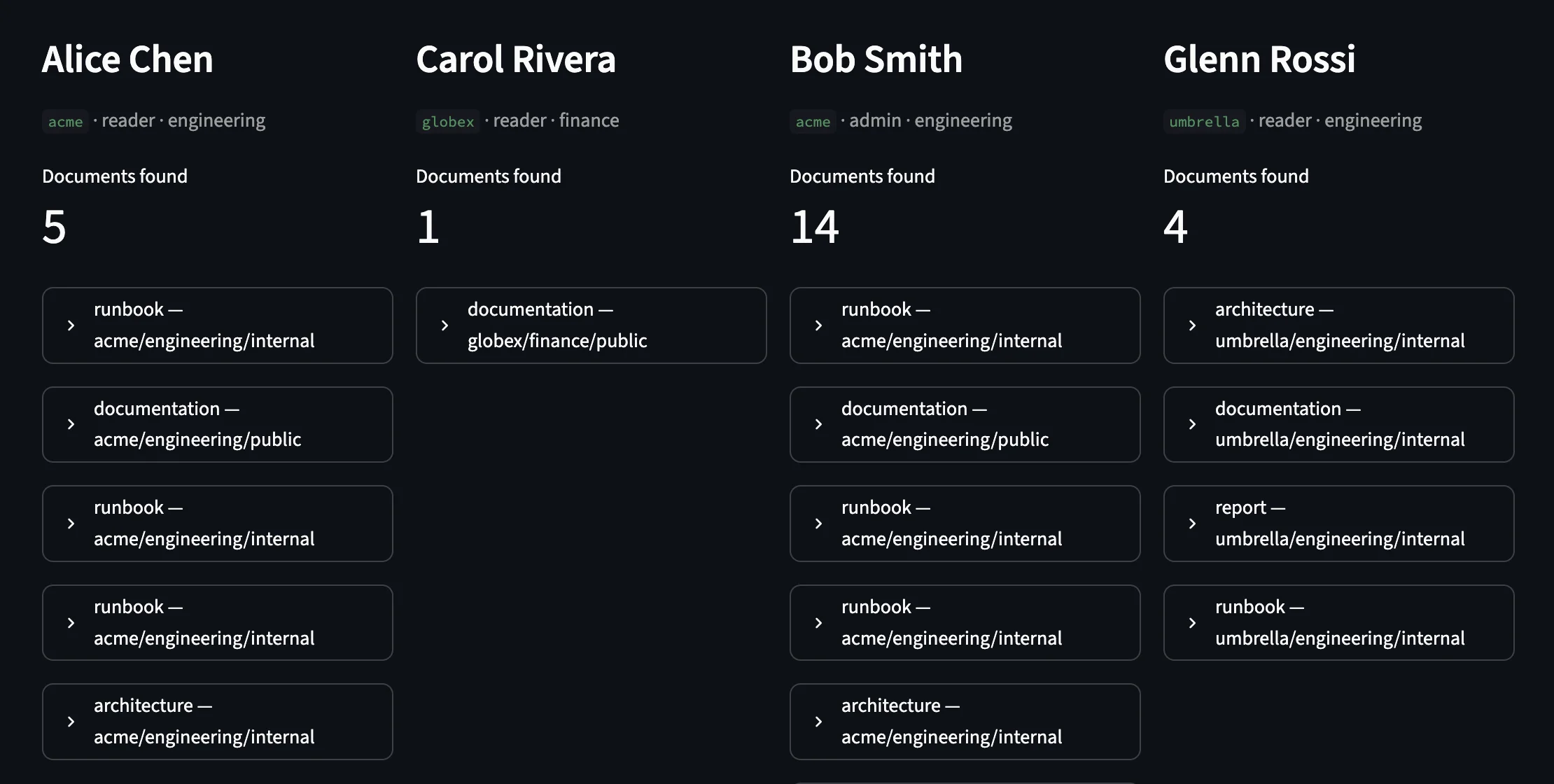
- Alice Chen (ACME engineering reader) gets exactly 5 documents. The gateway injected
org = 'acme' AND team IN ('engineering', 'all') AND access != 'confidential', directing Qdrant to traverse only ACME’s local HNSW subgraph. - Carol Rivera (Globex finance reader) gets exactly 1 public document. The gateway injected
org = 'globex' AND team IN ('finance', 'all') AND access != 'confidential', restricting her search to Globex’s finance subgraph. - Bob Smith (ACME admin) is granted administrative permissions. The gateway bypasses department filters but keeps him within the tenant boundary (
org = 'acme'). He retrieves all 14 ACME documents. - Glenn Rossi (Umbrella engineering reader) retrieves exactly 4 documents matching his organization and department permissions.
AST-Level Query Mutation
Exposing a query interface to untrusted clients makes string manipulation a major vulnerability. In SQL, an attacker can bypass queries by injecting comments (--) or logical overrides (OR 1=1). If you try to secure vector search using regular expressions or string replacement, a prompt-injected LLM can write QQL queries that slip past your filters.
The QQL Gateway avoids this by working directly on the parsed query tree:
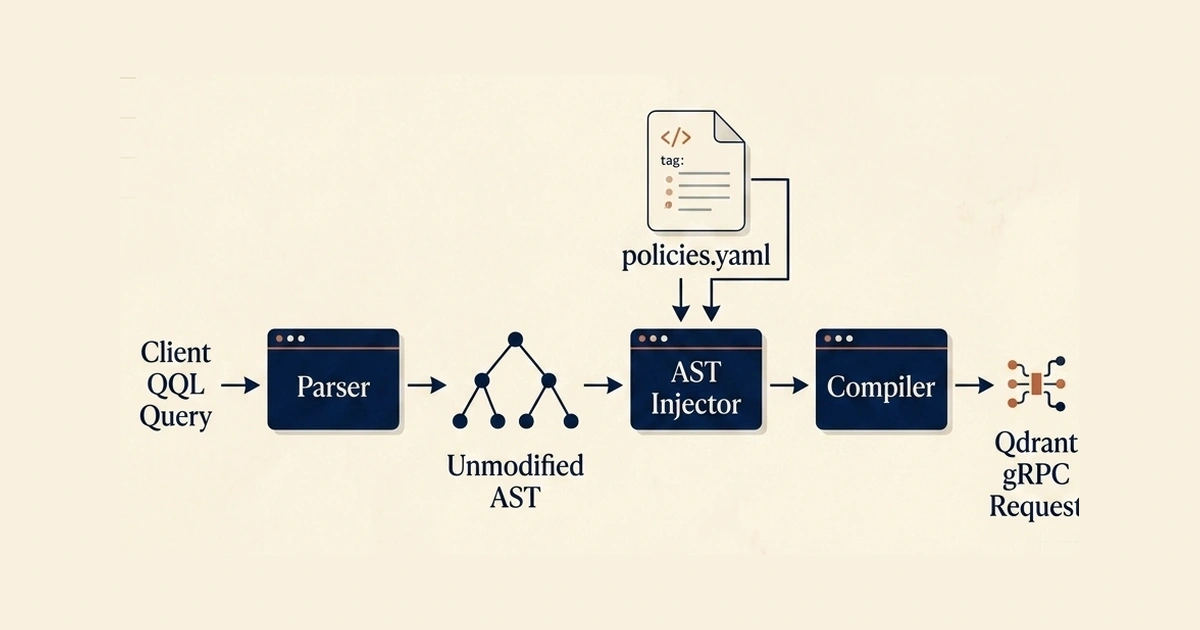
When a request arrives, the gateway executes a clean execution flow:
- JWT Verification: It validates the bearer token in the
Authorizationheader against the JWKS endpoint. - AST Parsing: The query passes through the lexer and parser, producing a structured tree of Go structs (like
SelectStatementorScrollStatement). - Policy Matching: The gateway matches the JWT claims against
policies.yaml. - AST Injection: The injector walks the tree, finds the
WHEREclause, and structurally merges the policy filters. - gRPC Compilation: The modified AST is compiled directly into Qdrant’s filter conditions and sent over Connect RPC / gRPC4.
Let’s look at how the injector handles Alice’s request. The incoming query is parsed into a tree. If Alice wrote a simple query without filters:
SCROLL FROM docs LIMIT 20The AST injector modifies the tree by inserting a WHERE node containing the policy filters:
SCROLL FROM docs
  WHERE org = 'acme'
    AND team IN ('engineering', 'all')
    AND access != 'confidential'
  LIMIT 20
If Alice had already specified a condition (e.g., WHERE year >= 2025), the injector wraps both nodes in a new parent AND node:
SCROLL FROM docs
  WHERE (year >= 2025)
    AND (org = 'acme' AND team IN ('engineering', 'all') AND access != 'confidential')
  LIMIT 20
Even if an attacker attempts a logical bypass by sending:
SCROLL FROM docs WHERE true OR org = 'globex'The compiler isolates the client’s input, producing a tree equivalent to:
WHERE (true OR org = 'globex') AND org = 'acme'Under Boolean reduction, this always evaluates to org = 'acme'. The caller cannot escape their tenant boundary because the gateway controls the structure of the query, not just its text.
Policies as Code
Access controls are defined in a central policies.yaml file. The gateway watches this file using fsnotify, hot-reloading rules in memory within milliseconds without dropping active connections or requiring a restart.
Here is the policy ruleset used in our demo:
# policies.yaml
rules:
  # ── Platform admin: bypasses tenant scoping
  - match:
      claims:
        role: platform_admin
    allow: [QUERY, INSERT, UPDATE, DELETE, SCROLL, SELECT, SHOW, CREATE, DROP, EXPLAIN]

  # ── Org admin: tenant isolated, full read/write
  - match:
      claims:
        role: admin
    allow: [QUERY, INSERT, UPDATE, DELETE, SCROLL, SELECT, SHOW, CREATE, EXPLAIN]
    inject:
      where:
        field: org
        from_claim: org_id
        op: "="

  # ── Manager: tenant isolated, read/write, sees confidential docs
  - match:
      claims:
        role: manager
    allow: [QUERY, INSERT, UPDATE, SCROLL, SELECT, SHOW, EXPLAIN]
    inject:
      where:
        field: org
        from_claim: org_id
        op: "="
    limits:
      max_limit: 200

  # ── Reader: tenant + team scoped, hides confidential docs
  - match:
      claims:
        role: reader
    allow: [QUERY, SCROLL, SELECT, SHOW, EXPLAIN]
    collections: [docs]
    inject:
      filters:
        - field: org
          from_claim: org_id
          op: "="
        - field: team
          from_claim: department
          op: "in"
        - field: access
          value: "confidential"
          op: "!="
    limits:
      max_limit: 50
Layered Protection
- Operation Controls: The gateway checks the parsed query statement against the
allowkeyword list. If a reader tries to runDELETE FROM docs WHERE id = 1001, the gateway rejects it at the proxy boundary before Qdrant is ever contacted. - Limit Capping: If a user attempts to scrape the database by running
LIMIT 1000, the gateway updates the AST to match the role’smax_limit(e.g.50for readers). - Rate Limiting: Per-user rate limiting is handled by an in-memory token-bucket limiter keyed by the JWT’s
subclaim.
Structured Audit Logs
To maintain visibility, the gateway outputs structured JSON logs for every query. This log records who executed the query, which policy matched, which filters were injected, and the Qdrant execution latency:
{
  "ts": "2026-06-20T05:12:04Z",
  "subject": "acme_alice",
  "email": "[email protected]",
  "tenant_id": "acme",
  "roles": ["reader"],
  "operation": "SCROLL",
  "collection": "docs",
  "query": "SCROLL FROM docs LIMIT 20",
  "filters_injected": ["org = 'acme'", "team IN ('engineering', 'all')", "access != 'confidential'"],
  "limit_capped": 50,
  "allowed": true,
  "denied": false,
  "latency_ms": 3,
  "status": "allowed"
}
This ensures security teams can monitor and audit access boundaries across a shared database cluster.
Run the archived playground (historical)
This demo is the archived qql-go tree. It is not maintained. For current isolation, use inject_filter in qql-rs. If you still want to read the old sandbox, clone the archived server-gateway folder(opens in a new tab)5.
The runner bundled a FastAPI identity provider (JWTs / JWKS), the Go QQL gateway, and a Streamlit UI.
Step 1: Start Qdrant
Ensure a local Qdrant container is running:
docker run -d --name qdrant -p 6333:6333 -p 6334:6334 qdrant/qdrant:latestStep 2: Start the Stack
Run the startup script in the server-gateway(opens in a new tab) folder5. The script builds the gateway with m = 0 sharding, starts the services, seeds the 64 multi-org documents with is_tenant = true keyword indexes, and launches the dashboard:
cd examples/server-gateway
./start_ui.sh
Open http://localhost:8501 to access the Streamlit UI, where you can log in as different users (such as [email protected] / alice123 or [email protected] / carol123) and inspect the query plans and transformations.
Frequently asked questions
Does the gateway require re-indexing Qdrant when permissions change?
No. The gateway rewrites queries dynamically at runtime based on the JWT claims. The index, points, and payloads in Qdrant remain untouched.
What happens if the gateway cannot reach the auth server?
The gateway fails closed. If it cannot retrieve public keys to verify the JWT signature, the request is rejected immediately, and no database queries are executed.
Should I still run the qql-go gateway?
No. The repo is archived. Put inject_filter in your own host (Python, Node, Rust, WASM) after you parse untrusted QQL. See Prevent RAG data leaks. Current language docs: qql.veristamp.in(opens in a new tab).
Can a prompt-injected agent bypass the AST filter?
No. The agent does not hold Qdrant keys. It talks to the gateway with the user’s JWT. The gateway takes tenant and role from the verified token and writes them onto the AST. The model cannot delete that node.
Does a payload filter on tenant_id already stop RAG leaks?
Only if every code path injects it from a trusted identity, not from the query string. Qdrant will run a request that omits the filter. is_tenant=true speeds tenant search. It does not authenticate.
Conclusion
Vector databases like Qdrant are highly optimized search engines. When configured with m = 0 HNSW graphs and is_tenant = true payload indexing, they build isolated, high-performance tenant subgraphs. But they lack access controls, JWT validation, and tiered policy layers.
Shifting access control into the compiler is still the right move: JWT (or your own identity) plus AST filter injection. Do that in qql-rs today, not in the archived Go gateway.
Pair agent runtimes with Code Mode. For CLI ops patterns, the retrieval operations post is historical. Current install and language: qql.veristamp.in(opens in a new tab)6. The old compiler is still readable on GitHub(opens in a new tab)7.
References
Footnotes
-
Qdrant. “Multitenancy.” https://qdrant.tech/documentation/manage-data/multitenancy/(opens in a new tab) ↩
-
Lakhan Samani. “Permission-Aware RAG with Authorizer, OpenFGA, and Qdrant.” Authorizer Dev Blog. https://blog.authorizer.dev/permission-aware-rag-authorizer-openfga-qdrant(opens in a new tab) ↩
-
Srimon Danguria. “qql-go repository” (archived 2026-08-02). GitHub. https://github.com/srimon12/qql-go(opens in a new tab) ↩
-
Connect RPC. “Connect, A simpler gRPC.” https://connectrpc.com/(opens in a new tab) ↩
-
Srimon Danguria. “qql-go server-gateway example.” GitHub. https://github.com/srimon12/qql-go/tree/main/examples/server-gateway(opens in a new tab) ↩ ↩2
-
QQL (current). Language, CLI, and SDK docs. https://qql.veristamp.in(opens in a new tab) ↩
-
Srimon Danguria. “qql-go gateway compiler code.” GitHub. https://github.com/srimon12/qql-go/tree/main/server(opens in a new tab) ↩